Quick Reference (QR) Codes are a type of Matrix Barcode capable of storing much more information than your normal stripy barcode.
Many organisations have taken to using QR codes as part of an integrated marketing campaign to store web page URLs, allowing users to capture the 'barcode' on their mobile phone cameras in order to visit the site in a quick and easy fashion.
QR Codes from Google Chart API
The Google Chart API has, among other things, the facility to generate QR codes of all types, encoding within them text, binary data or Kanji strings that you define - up to the maximum data limit of a QR code.
If like me you have had some frustration trying to get Premiere Elements to work with VADO HD video, without hanging on import, you may find this solution helpful.
When for a recent birthday I was the glad recipient of a new VADO HD pocket video camera, and a new sealed Premiere Elements 7, I was excited to get editing some footage. However I quickly ran into trouble - when importing the VADO footage into Elements it would either hang, or if it did import would apparently have no picture. Worse, because of the way the Elements video library previews video assets from all your projects by default, Elements would fail to start up and hang - purely because some VADO HD footage was in the library.
If Premiere Elements won't start because of a dodgy video file in the library
First, if Elements won't start, or hangs, because you have some incompatible footage in the library the simplest cure is to rename the suspect file, or rename the folder it is in, before you start elements. This will break the link Elements has to the file. Then Elements will start properly and give you a 'file not found' icon where the video thumbnail once was in the library. At this point you can simply click on it in the library and delete it.
Making Premiere Elements read VADO HD video files
In trying to solve this I have tried 2 conversion methods (one using Super, and another using Prism), but either of those means a laborious process of mass conversion, and you end up with duplicate files in different formats, and the converted files are either much larger than the originals, or a lower quality I found.
The best solution was simply to install the K-Lite Codec Pack. The installer checked for conflicting codecs as it went along, giving me the option to remove them automatically (which I did). I used the advanced installer option so I could choose what to install, and selected the "lots of stuff" option so I got pretty much everything - including the all important h.264.
Once installed I ran Premiere Elements, imported a native unconverted VADO HD video file and added it to the timeline with barely a pause in the action.
Forget laborious file conversion - try installing the K-Lite Codec Pack before you do anything else.
Still stuck?
If you still have problems you may find the following helpful:
.NET magazine reports this month that Adobe has released a "Flash-to-web-standards converter" called Wallaby, that basically takes your FLA file and spits out standards compliant HTML5 with accompanying JavaScript.
I must say I was waiting for Adobe to make a move like this ever since Apple got the mardies and decided to not support the Flash Player on its mobile devices. But I thought it might be a feature of CS6, I didn't expect it to be a free Adobe AIR app that I could download today.
.NET quotes senior product manager at Flash Professional as saying "Wallaby's initial focus is on converting banner ads and simple animations to HTML5, to cater for iOS, but that future development will be driven by consumer requirements..." buy .NET for more info.
So, while not expecting great shakes for some of my more advanced Flash work, I can't wait to see what it can do... I'm going to have a play.
I started this experiment ages ago, but ran into a problem with the sound I couldn't solve straight away. 18 months later I remember it exists and blow the dust off to find the problem still waiting for me.
Just in case any one else has struggled with the same problem... I now have the solution, or at least know why that particular approach wouldn't work and have an alternative.
Once you set up a Sound Object you can either use attachSound to connect an embedded sound from your document Library, or you can use loadSound to load in an external MP3 file. But... and this is where I went wrong... you can't do both. In other words, if the first time you initialise the sound object you use attachSound you can't later change the sound using loadSound and expect it to behave normally. At least that was my experience.
My experimental app was a 2 channel audio mixer that used 2 Sound Objects, one for each channel. The mixing was done very simply by reducing the volume of one Sound Object while simultaneously increasing the volume of the other. So far so good.
However, for the Sound Objects to properly initialise, (and therefore the volume control code work properly) they needed to have a sound loaded into them straight away. The most obvious solution to me was to use attachSound to connect a sound embedded in the movie. So I made a couple of MP3s of 0 second duration and used those embedded within the app. Fine, the Objects initialised OK.
However, to be useful you need to be able to load external MP3s in, or it's only a 2 song show. And that's where the problem arose, because I would need switch from using attachSound to loadSound after the object initialised, and all of a sudden the volume control stops working as expected.
And that's what stumped me. It was only coming back with fresh eyes that allowed me to spot this discrepancy.
So, how to overcome it?
Simples - use loadSound from the first, but get Flash to load a non-existent sound by getting it to load nothing (e.g. ""). Sure, Flash will error, and complain it can't find the file, but the Sound Object will still initialise correctly - and the error is only visible when you test the movie from within the authoring software, not once exported.
Hey presto, when I load an external sound it all works, because I used loadSound all along and didn't change method later on. My music mixing app finally works.
It's possible there are other factors or other solutions - happy to hear about them, but that's how I got round it.
In my last post I looked at querying the Yahoo GEO and Weather APIs from within flash in order to return an XML file containing weather and forecast information.
Last time I simply pulled out the location and the weather condition text that gave a general description of the current weather. But actually the XML contains many more items than that. One of which is the prevailing temperature of the location being queried.
Displaying the temperature as text is relatively easy but you can also be more graphic, as in my virtual thermometer above.
In this prototype I am simply using the temperature data, which Yahoo provides as an integer, to determine the length of the 'mercury' in the thermometer.
How it was done
The Graphics
First I made all the pretty graphics in Fireworks (but you could use Photoshop, Paint.net, PhotoPlus etc.), and imported the assets into Flash. The important thing is that your scale (that's the Celcius and Farenheit rulers are correctly in line with each other, and the increments are spaced evenly on each scale).
To do this you need to understand the following:
-40C is the same as -40F (that's where the two scales meet)
0C is the same as +32F
+50C is the same as +122F
On that basis you should be able to construct C and F scales that line up the way they should. I did it by making two the same and then scaling the F scale smaller vertically so that -40 F and 122 F lined up with -40 C and 50 C respectively.
I also chose to run my scales from -40C to +50C because using the Yahoo Weather API I needed a scale that would reasonably take all global temperatures. I figure that somewhere might get close to -40C and somewhere might get up to +50C. If it turns out my scale isn't big enough I can always ammend it.
The 'Mechanics'
Once the graphics are in Flash I create a small red rectangle for the 'mercury' and turn it into a MovieClip (press F8) with the registration point at the bottom left, and with the instance name "liquid_mc". Then I create a transparent rectangle for the tube in which the 'mercury' travels and turn it into a MovieClip with the instance name "tube_mc" - this needs to be exactly the same height as the distance between the lowest temperature on your graphical scale (in my case -40C) and the highest temperature (in my case +50C) - for me this turned out to be 360 pixels, but it will vary depending on the size and shape of your graphical representation of the scale.
I place the two MovieClips on top of the graphic in the right place at the bottom of the graphical glass tube so when the the 'mercury' grows it will grow up from the bottom.
Then I select the graphic, the "tube_mc" and the "liquid_mc" and turn them all into a MovieClip with the instance name "thermometer_mc", so that "tube_mc" and "liquid_mc" are inside "thermometer_mc".
Finally, create a button, and add it to the stage with the instance name "submit_btn". Users will need to press this to run the query of the Yahoo API and display the result.
The Code
Then I create a new layer, give it the name 'actions' (so all my code is neatly in one place), and put in the following actionscript. Read my comments in the code to see what is happening:
stop ();

/*Thermometer*/

/*calculate the pixel height of 1 degree c by dividing the height of the thermometer tube by the number of degrees c it covers*/

var degree:Number = _root.thermometer_mc.tube_mc._height / 90;

/*calculate zero - because our thermometer starts at -40C we use this to ensure future calculations take account of this fact*/

var zero:Number = degree * 40;

/*Accessing the Yahoo API to find out the weather in any location using postcode and country code*/

/*set the search terms as variables, you can pull these from user input with some different ActionScript */

_root.submit_btn.onPress = function () {

var zip = "SW1A 1AA";

var country = "UK";

/*Find the WOEID*/

woeidXml = new XML ();

woeidXml.ignoreWhite = true;

/* run the loadWoeid function when the XML file loads that contains Yahoo's reply to our query below*/

woeidXml.onLoad = loadWoeid;

/* ASK QUESTION 1 - query the Yahoo API using YQL and the search terms above */

woeidXml.load ("http://query.yahooapis.com/v1/public/yql?q=select%20woeid%20from%20geo.places%20where%20text%3D%22" + zip + "%2C" + country + "%22&diagnostics=true");

/* this function will run when the XML file loads that contains Yahoo's reply to our query */

function loadWoeid () {

/*parse the XML response and store the woeid value as a variable in Flash called 'woeid'*/

woeid = woeidXml.childNodes[0].childNodes[1].childNodes[0].childNodes[0].childNodes[0];

/*find the WEATHER from the WOEID just gathered*/

/* we nest this function for question 2 within the function for question 1 because doing it this way means that question 2 is not asked until question 1 has an answer*/

weatherXml = new XML ();

weatherXml.ignoreWhite = true;

/* run the loadWeather function when the XML file loads that contains Yahoo's reply to our query below*/

weatherXml.onLoad = loadWeather;

/* ASK QUESTION 2 - query the Yahoo Weather API using the woeid we found out in question 1 above */

weatherXml.load ("http://weather.yahooapis.com/forecastrss?w=" + woeid + "&u=c");

/* this function will run when the XML file loads that contains Yahoo's reply to our query */

function loadWeather () {

/*parse the XML response and store the current temperature condition value as a variable in Flash called 'temp_xml'*/

temp_xml = weatherXml.childNodes[0].childNodes[0].childNodes[12].childNodes[5].attributes.temp;

/*set current temperature variable from XML*/

var temp_c:Number = temp_xml;

/*set height of the thermometer liquid_mc graphic based on the temperature extracted from the XML*/

_root.thermometer_mc.liquid_mc._height = (temp_c * degree) + zero;

}

}

};
As you will see, this is virtually the same code as in my previous post, the main difference is how we use the extracted data to change the height of a MovieClip that represents the 'mercury' in the thermometer. To find the temperature of a different location simply change the values of zip and country on lines 10 and 11.
I went a bit further (not explained in this post) and put in some text input fields so that the user can define their own location (maybe I will get time to explain that in a future post).
I spent some of this weekend examining the potential of the Google API for finding out the weather in my area. My long term aim is to include some nod to local weather in a Flash app I am working on. While the Google API was easy to tap into (see here) it is not very well documented and apparently unofficial and may change or vanish without warning (see discussion here) - which wouldn't bode well for inclusion in an app.
It was Jason Emerick's blog that pointed me towards the Yahoo API as an alternative with better documentation and official support. Now I have always been a fan of Google over Yahoo, but needing reliability I sloped over to Yahoo and revived my dormant account. It wasn't long before I was utterly convinced that Yahoo have an excellent API with excellent support, and a terrific console to help you try out your queries and test the results.
Differences between getting Google weather and Yahoo weather
While powerful, the Yahoo API didn't give me the weather information I was after with quite the same ease as the Google API. With the Google API all you needed to do is call the API URL and append your location to the end:
http://www.google.com/ig/api?weather=london,uk
The results are XML you can parse using your chosen language (in my case ActionScript).
Yahoo on the other hand isn't quite as straightforward (though much better once you get the hang of it). This is because you can't directly query Yahoo's weather API using your chosen location as you can with Google. Yahoo instead requires you to specify the WOEID (Yahoo's proprietary "Where On Earth ID") of the location you want to know the weather for.
Once you know the WOEID of the location, finding the weather for that location is as simple as:
The challenge is, of course, that most people won't know what the WOEID for their location is and so won't be able to use it to find out the weather in their area. I don't know my WOEID, that's for sure.
So we have to first find out our WOEID from our known location. You can do that like this:
The Yahoo API console is very helpful in letting you experiment with the queries, and producing URLs like the one above for you to call in your code.
So knowing that with 2 questions I can still get the information I need from Yahoo, I felt more confident pressing ahead with the Yahoo API with its better documentation and promise to give 6 months notice to any changes. A far cry from Google's relative silence on the issue with their unofficial weather API.
Using ActionScript to query the Yahoo geo and weather APIs
So ultimately I have to ask 2 questions of Yahoo with my ActionScript. First - what is the WOEID for my location given as postcode, country? Second - what is the weather forecast for this WOEID?
For question 1 my ActionScript will use this query via the Yahoo YQL API to find out the location's WOEID:
For question 2 my ActionScript will simply reference Yahoo's weather API using the WOEID from question 1 as a query term, resulting in an XML file containing weather information for the location represented by that WOEID:
The trick with the ActionScript is to ask the questions in the right order, and to write your code so question 2 is not asked until it has the answer to question 1 (else you won't get a proper reply and your ActionScript won't get the XML it is expecting and will return 'undefined' where you were expecting the weather status).
Here's my solution, read the comments to see what I am doing there:
/*Accessing the Yahoo API to find out the weather in any location using postcode and country code*/

/*set the search terms as variables, you can pull these from user input with some different ActionScript */

var zip = "SW1A 2AA";

var country = "uk";

/*Find the WOEID*/

woeidXml = new XML ();

woeidXml.ignoreWhite = true;

/* run the loadWoeid function when the XML file loads that contains Yahoo's reply to our query below*/

woeidXml.onLoad = loadWoeid;

/* ASK QUESTION 1 - query the Yahoo API using YQL and the search terms above */

woeidXml.load ("http://query.yahooapis.com/v1/public/yql?q=select%20woeid%20from%20geo.places%20where%20text%3D%22" + zip + "%2C" + country + "%22&diagnostics=true");

/* this function will run when the XML file loads that contains Yahoo's reply to our query */

function loadWoeid () {

/*parse the XML response and store the woeid value as a variable in Flash called 'woeid'*/

woeid = woeidXml.childNodes[0].childNodes[1].childNodes[0].childNodes[0].childNodes[0];

/*test the value we have stored with a trace*/

trace (woeid);

/*find the WEATHER from the WOEID just gathered*/

/* we nest this function for question 2 within the function for question 1 because doing it this way means that question 2 is not asked until question 1 has an answer*/

weatherXml = new XML ();

weatherXml.ignoreWhite = true;

/* run the loadWeather function when the XML file loads that contains Yahoo's reply to our query below*/

weatherXml.onLoad = loadWeather;

/* ASK QUESTION 2 - query the Yahoo Weather API using the woeid we found out in question 1 above */

weatherXml.load ("http://weather.yahooapis.com/forecastrss?w=" + woeid + "&u=c");

/* this function will run when the XML file loads that contains Yahoo's reply to our query */

function loadWeather () {

/*parse the XML response and store the current weather condition value as a variable in Flash called 'condition_xml'*/

condition_xml = weatherXml.childNodes[0].childNodes[0].childNodes[12].childNodes[5].attributes.text;

/*parse the XML response and store the current weather place name value as a variable in Flash called 'place_xml'*/

place_xml = weatherXml.childNodes[0].childNodes[0].childNodes[6].attributes.city;

/*test the values we have stored with a couple of traces*/

trace (condition_xml);

trace (place_xml);

}

}
And that's a wrap. Ideally I wanted to get a single answer from Yahoo by linking the 2 questions in their API, but that proved difficult using just YQL because Yahoo would not provide weather data using YQL unless you knew the location (another apparently random code different again to the woeid) or you provided a US zip code (so no good to us Europeans). So I settled on this 2 stage solution that works for me.
Bugs or traits include being able to swap where I input a postcode with the name of a city, and you still get working results from Yahoo provided it has heard of the city.
Anyway, I know how I will use this, so if you have a use for this happy coding.
Addendum
Here's an implementation of the above code that takes user input and delivers the result.
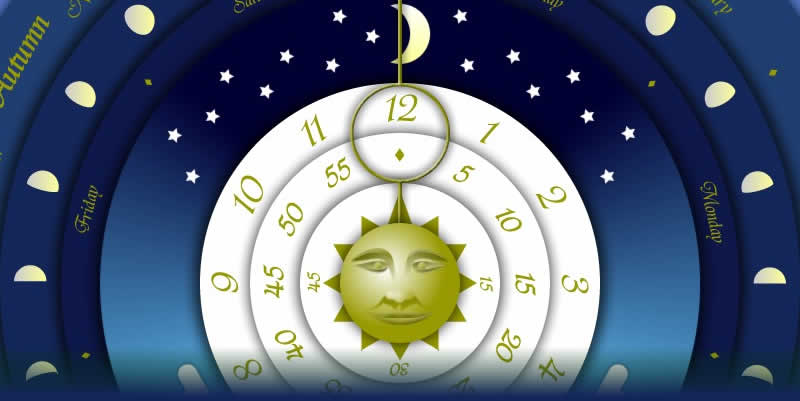
Some projects are just plain fun. You get an idea, you get inspiration on how it should look, you research the maths that goes behind it and crack on until it is done. The Annual Clock is one such project for me. I actually finished it as a Flash application almost a year ago, but only just got round to converting it into a screensaver.
The Idea
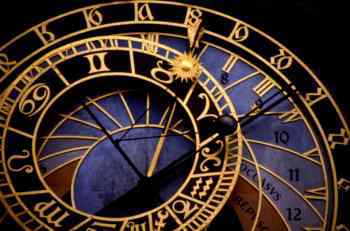
Visually it was inspired by astronomical clocks of yester-year (such as the one below).
My aim however was not to portray the movement of heavenly bodies as much as it was to portray the passage of time in a more unique way than the standard hour, minute and second hands. Something about a clock that showed all layers of 'time' passing at once seemed an exciting and relatively unique prospect. My approach took a series of discs, each portraying a different element of time measurement, radiating out from the centre, with each disc moving progressively more slowly working from the instant, through seconds, minutes, hours, daylight, days, moon phases, months and seasons. I stopped there since the next levels (e.g. years, centuries, milleniums etc) would give the clock a lifespan, something I wanted to avoid. Rather than using hands I had the discs rotate instead, with the centre point representing the person - the instance of time in which we exist now.
But enough of concept.
The Maths
The code for the passage of time is pretty straightforward. You take the current computer system time and date, and use it to rotate the discs as a proportion of 360 degrees. Not too difficult. The tricky part was dealing with items that don't stick rigidly to our calendar such as Easter, the moon phases, and the solstices and equinoxes.
For the Easter calculation I did an ActionScript implementation of a formula on the BBC H2G2 website.
For the solstices and equinoxes I did an ActionScript implementation based on the astronomical algorithms of Jean Meeus (Astronomical Algorithms, 1st Ed., 1991) which someone had posted online somewhere (can't remember where now). Meeus's formulas calculate the date of the current year's solstices and equinoxes, but gives the result as a date using the Julian calendar. (In fact Meeus's formulas calculate the time of the events to within 4 minutes of actual with any error down to orbital perturbation - how cool is that?)
However a Julian date was not suitable for my needs, and meant some highly complex conversion from the Julian to the Gregorian calendar based on a formula published online by Utrecht University.
I confess I didn't understand most of the formulas (but then I am not an astrophysicist or mathematician - and I gave all sources their dues in my ActionScript comments). But that's the great thing about ActionScript's mathematical functions - if someone has written it out, it is fairly logical how you need to set up the same thing in ActionScript.
The moon phases are based on the mean moon phase duration as reported by NASA from the year 2000 (so it won't be perfect forever, but pretty good for this purpose).
So, my particular thanks go to Meeus, Utrecht University and NASA for helping me with the bit I could never work out on my own without some serious long term astronomical observations of my own. The practical upshot is a Flash based clock application that not only shows the passage of time from seconds to seasons, but also one that can predict Easter, the equinoxes and solstices, and understands that moon phases are not precisely 28 days long. Thanks folks.



 Posts
Posts


